


QToon
4.8198.00 Reviews
App Specs
- Version
- 1.9.6
- Updated On
- License
- Free
- Downloads
- 500,000+
- Developer
- MD Apps Gateway
- Categories
- Comics
- Platform
- Android
Screenshots



 Analysis by AppCompare
I tend to judge a comics app by what happens after the first few minutes: can I find something that suits my mood, read comfortably on a small screen, and return to a story without turning the app into another chore? That was the standard I brought to QToon. It is a free comics app from MD Apps Gateway, and its focus is reading comics and manga. My first impression was welcoming, though a pleasant opening screen is only the start of what makes a reading app useful.
Finding your way into a story
The first place readers can get stuck is choosing what to try. Bright cover art makes browsing inviting, but it can also make every option look equally promising. I would treat the home screen as a place to sample, not as proof that every title will suit me. When I am unsure, I look for a premise that matches the time I have: a short session calls for something I can pause easily, while a longer stretch is better for settling into a story with room to develop.
That distinction matters because browsing and reading are different kinds of attention. If I open the app during a spare moment, I do not want to spend the whole break scanning covers. I make a small choice, read a few pages, and give myself permission to move on if the tone or pacing is not working. This is a practical way to explore a broad comics selection without feeling that I have to commit to the first series I open.
For readers deciding whether to install it, the basics are straightforward: it is free, its content rating is Everyone, and it has a 4.8 average from around 18 thousand ratings. It has passed 500 thousand installs, which suggests it has reached a substantial audience, though popularity alone cannot tell you whether its selection fits your taste. The version is 1.9.6, and it runs on Android 7.0 or later. Those details make it easier to check compatibility before spending time setting up a reading routine.
Setup checks that save frustration
Before blaming a comic app for a slow or awkward first session, I check the simple things: whether the phone meets the Android requirement, whether the connection is steady while browsing, and whether the device has enough room for any reading material I intend to keep available offline. These checks are useful habits rather than special tricks, and they help separate a device or network issue from an app problem.
I also recommend testing the reading experience with one title before building a long queue. Look at how the panels fit your screen, whether scrolling feels natural, and whether the text is comfortable at your usual brightness. A comic that looks excellent in a thumbnail may be less pleasant to read if you find yourself repeatedly adjusting how you hold the phone. A brief trial gives you a better answer than judging the app from its cover art alone.
In my experience, late-night reading is where small comfort choices matter most. I lower the screen brightness before opening a chapter and take a pause if I start rushing through panels. The app offers customizable reading settings, which is useful when the default presentation does not feel right. I would change one setting at a time, then read a few panels before adjusting again; otherwise it is hard to tell which change actually helped.
Worth Reading Before You Choose

EA SPORTS FC Mobile 26 Is a Bigger Football Game, but It Takes Time

Flipboard Shows What News Apps Must Do Beyond the Feed

Switching to Android Auto Means Rethinking Your Driving Routine

Google Calendar Makes a Crowded Week Easier to Manage

Ludo King Makes the Most of the Minutes Between Plans

Baby Panda World Brings Quick Play to Modern Phones, but Its Game Library Feels Busy
Building a reading routine that fits real life
A realistic use case is a commute with an unreliable connection. If a comic is available to download for offline reading, I would prepare it while I still have dependable internet, then check that it opens before leaving. That extra check is more reliable than assuming a title will be ready when the train enters a tunnel. Offline access is valuable for travel, waiting rooms, or a break at work, but it works best when planned rather than treated as an emergency fix.
There is a trade-off to that preparation: downloads use device storage, so I would keep only the material I expect to read soon and review what I have saved when space gets tight. That is a general device-management habit, not a claim about a particular storage control in the app. If space is limited, reading online when the connection is good may be more convenient than trying to keep a large offline collection on the phone.
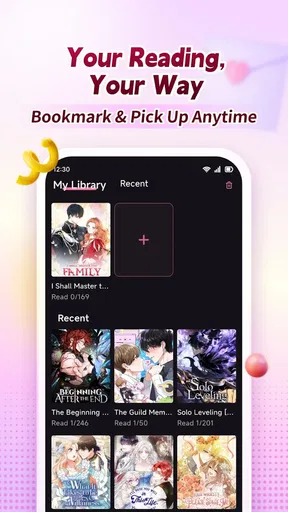
For a busy day, I would use a simple workflow: browse when I have time, choose a story before the connection becomes uncertain, and use a short reading session to see whether its style holds my attention. If I want to continue later, I would reopen the title and check my place rather than relying on memory. The app is described as syncing across devices, so a reader who switches between devices has a reason to try that handoff; I would still confirm that the story resumes where I expect before depending on it for a long trip or a reading deadline.
This routine also helps answer a common practical question: is this better for occasional reading or for following several series? I see it as suitable for either, provided I keep my own queue manageable. If I sample too many titles at once, it becomes difficult to remember which story I wanted to continue. I prefer to finish or deliberately pause one before adding several more, especially when I am using comics to unwind rather than to keep up with a reading backlog.
What the social side adds—and when to skip it
Reader discussion can make a series more enjoyable when I want to compare interpretations or see what other fans noticed. Comments and discussions give the reading experience a social dimension, and community activities can encourage people to explore beyond the titles they already know. I would use that side selectively: read reactions after finishing a chapter if I want to avoid having other readers’ theories shape my first impression.
That is also where personal preference matters. Some readers love talking through every reveal; others want a quiet, uninterrupted session. If I am reading mainly to relax, I can focus on the comic and treat community features as optional rather than as part of the basic routine. Anyone who dislikes comment sections or prefers a strictly private reader may get less value from that community emphasis, even if the comics themselves appeal.
The app’s events and challenges may give regular readers another reason to participate, but I would approach them as extras rather than as the main reason to install. A challenge can be a pleasant prompt to try something unfamiliar; it should not turn leisure reading into a task list. If the social layer is not what I am looking for, I can still judge the app on its reading experience and whether I find stories worth returning to.
How it compares with other ways to read
Compared with a general digital book reader, a comics-focused app is the more natural place to browse illustrated storytelling and move through panels on a phone. A general reader may be preferable if most of your library is prose or if you want one tool for many kinds of books. Compared with following individual creators or publishers through separate services, a broader comics app can make discovery feel less fragmented, while dedicated services may be a better fit for readers who care most about a particular catalogue or a very specific publishing routine.
I would not assume that one comics app replaces every other source. Readers who already know exactly which series they want may prefer the official service or publisher associated with that title, especially if they value a particular release schedule or catalogue. Someone who is still exploring may appreciate a place to browse across comics and manga instead. The choice comes down to whether discovery or access to a specific series matters more in everyday use.
For a first-time reader, the most useful test is not the number of covers on a screen but whether the app helps you find one story you genuinely want to continue. I would give it a short trial, sample a couple of different tones, and notice whether the panel flow and reading controls feel comfortable. If I leave with a title in mind and can return to it without fuss, the app is doing something useful; if I spend the whole session browsing without finding a match, a more focused catalogue may suit me better.
When the app may not be the cause
If a page takes a long time to appear, I first check whether other online apps are also struggling. A weak connection can affect browsing and loading, so trying again on a steadier network is a sensible first step. If only one title behaves oddly, I would leave it and test another before deciding that the entire reader is at fault. This is a simple way to narrow down whether the problem is tied to the connection, a particular item, or the broader app experience.
If reading does not resume where I expect, I would reopen the title and check the last panels I remember before making a bigger change. For a reader using more than one device, I would also give the sync process a moment and confirm the same account or reading context is being used, rather than immediately repeating a chapter or assuming progress has disappeared. These checks are modest, but they can prevent a small interruption from becoming a frustrating session.
When the app feels slow after a long reading session, I would close other demanding tasks, make sure the device has room to work, and restart the app if needed. I would avoid repeatedly changing settings while also changing networks, because that makes it harder to identify what helped. If the trouble continues across different titles and stable connections, then it is more reasonable to treat it as an app or device issue rather than a momentary network snag.
A good fit for explorers, with a few clear limits
The strongest case for using this app is for someone who enjoys discovering comics and manga, likes reading on a phone, and is comfortable trying a story before deciding whether to follow it. The combination of browsing, adjustable reading settings, offline downloads, and a community layer gives different kinds of readers several ways to make the experience their own. The developer, MD Apps Gateway, has built an app that has earned a 4.8 average across around 18 thousand ratings, but my deciding factor would still be whether its available stories match my interests.
I would be more cautious if I needed a very specific series, wanted a completely social-free reading environment, or preferred to manage a carefully curated library in a general-purpose reader. The same is true if I have limited storage and expect to download lots of material, or if my internet access is unreliable and I cannot prepare titles ahead of time. Those are not reasons to dismiss the app outright; they are situations where a different reading setup may be more convenient.
First impressions
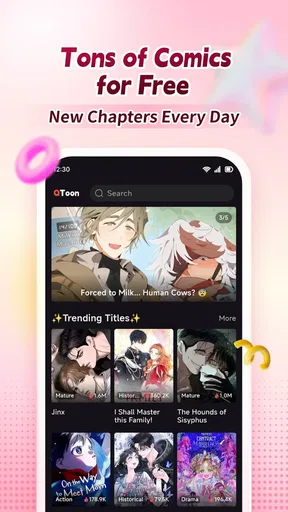
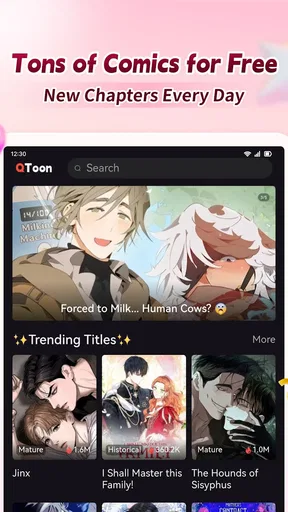
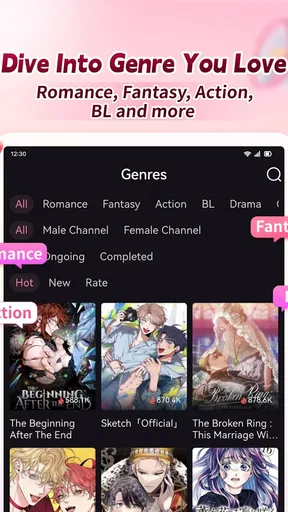
When I first opened QToon, I was immediately impressed by its sleek and user-friendly interface. The home screen is clean and well-organized, making it easy to navigate right from the get-go. The colorful thumbnails of the comics are enticing, and it's hard not to immediately start scrolling through the offerings.
Vast Library of Comics
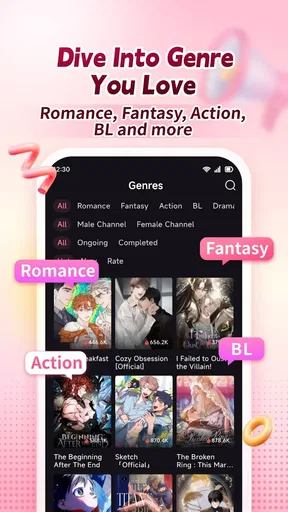
The app boasts an extensive collection of webtoons, from romance and drama to sci-fi and fantasy. Whether you're into heartwarming stories or thrilling adventures, there's something here for everyone. I found myself lost in a whirlwind of captivating stories that kept me entertained for hours.
One of the standout features is the app’s ability to introduce me to new artists and writers. It's like a treasure trove of undiscovered talent, and I love how the app promotes diversity in storytelling. It's refreshing to see unique narratives that break away from the mainstream.
User Experience and Features
Reading on the app is a breeze. The app allows for easy scrolling through the panels, and the images are sharp and vibrant, enhancing the reading experience. You can also customize your reading settings, which is a nice touch for those late-night reading sessions.
Another feature I found particularly useful is the ability to download comics for offline reading. This is perfect for those long commutes or when you're stuck without an internet connection. Plus, the app syncs seamlessly across devices, so you can pick up where you left off, no matter where you are.
Community Engagement
One aspect that sets the app apart from other comic apps is its strong community focus. Readers can engage with creators through comments and discussions, fostering a sense of connection and community. It's a place where fans can share their thoughts and theories, adding an extra layer of enjoyment to the reading experience.
The app also hosts events and challenges that encourage user participation. These activities not only promote engagement but also give readers a chance to win rewards and discover new content. It's a fun way to keep the community lively and interactive.
Final Thoughts
Overall, this is a compelling choice for comic enthusiasts. Its broad reading selection, approachable interface, and lively community make it worth exploring if you want to discover webtoons and comics. Whether you're a casual reader or a dedicated comic fan, you're likely to find something to enjoy, as long as the available stories suit your taste.
So, if you’re on the hunt for a new way to enjoy comics or discover stories beyond your usual picks, give the app a try. You might just find your next favorite series right at your fingertips.
Pros
- User-friendly interface for easy navigation.
- Wide variety of genres and styles.
- Regular updates with new content.
- Offline reading mode available.
- Customizable reading settings.
Cons
- Advertisements can be intrusive.
- Limited free content options.
- Occasional app crashes reported.
- In-app purchases can be expensive.
- Requires constant internet for updates.
FAQs for QToon
What is QToon and how does it work?
QToon is a mobile app designed for comic and manga enthusiasts, providing a platform to read and create webtoons. Users can browse a vast library of genres, ranging from romance to action, and save their favorites for offline viewing. With an easy-to-use interface, QToon offers both casual readers and aspiring creators a space to explore and share their creativity.
Is QToon free to use or are there any in-app purchases?
QToon is free to download and offers a variety of comics at no cost. However, it does include in-app purchases for premium content and ad-free experiences. Users can purchase coins to unlock exclusive chapters or subscribe to a membership for additional benefits, enhancing their reading experience.
Can I create my own comics on QToon?
Yes, QToon allows users to create and publish their own webtoons. The app provides tools for creators to upload their artwork, add text, and organize episodes. Once published, creators can gain followers and receive feedback from the community, making it an engaging platform for aspiring artists and writers.
Is QToon available offline?
While QToon requires an internet connection for browsing and downloading new content, it does offer an offline mode. Users can save their favorite comics and manga to their device, enabling them to read without an internet connection, which is perfect for long trips or areas with limited connectivity.
How does QToon handle content updates and new releases?
QToon frequently updates its library with new chapters and series. Users can enable notifications to be alerted about new releases of their favorite comics. The app's developers also regularly update the platform to fix bugs and introduce new features, ensuring a smooth and dynamic user experience.


